> ## Documentation Index
> Fetch the complete documentation index at: https://docs.getchatads.com/llms.txt
> Use this file to discover all available pages before exploring further.
# Overview
> What ChatAds is and how it looks in a live content experience
ChatAds is an embeddable AI chatbot for blogs and content sites. It gives visitors a way to ask questions in the context of the page they are reading, and it can optionally monetize those conversations two ways: by inserting Amazon affiliate links, or by reusing the affiliate links you already have on the page.
You install it with one script tag. There is no training step and no content ingestion project: the widget reads the page the visitor is on and answers questions about it out of the box.
## Product Walkthrough
## What It Looks Like
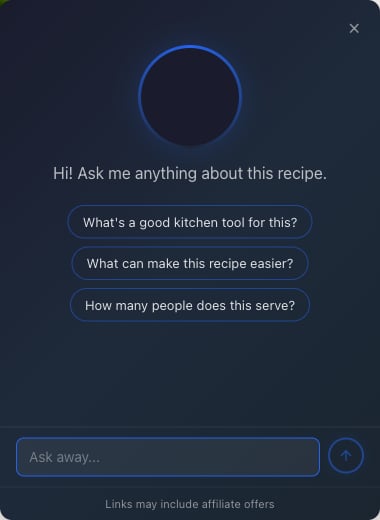
When a visitor opens the widget, they see a welcome message and up to three starter questions you configure:
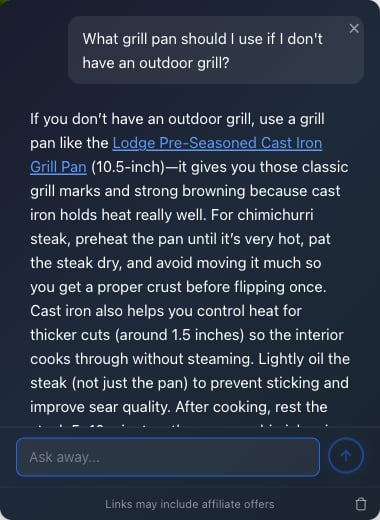
When monetization is enabled and the AI recommends a product, the product phrase becomes an in-line affiliate link, right inside the answer:
## Try It Live
Open the live recipe page and test the embedded ChatAds widget in a real content experience.
## The Dashboard
Everything is managed from [app.getchatads.com](https://app.getchatads.com). The dashboard has six tabs:
| Tab | What it does |
| ------------------ | -------------------------------------------------------------------------------------------------------------------------------------------------------------------------------------------------- |
| **Usage** | Daily message pacing against your plan limit, plus charts of page loads, messages, and affiliate link clicks. Includes a click log CSV export. See [Analytics & Conversations](/guides/analytics). |
| **Settings** | Widget key, embed snippet, allowed domains, page rules, and access controls. See [Installation](/guides/chatads-setup) and [Widget Configuration](/guides/widget-configuration). |
| **Customize** | Site name, welcome message, starter questions, colors, button text and position, page context, and a custom AI prompt. See [Customization](/guides/customization). |
| **Monetize** | The two monetization toggles, Amazon Associates tags (US + UK), ad frequency controls, and product quality filters. See [Monetization](/guides/chatads-monetization). |
| **Conversations** | Read transcripts of what visitors asked and how the AI answered, with search and CSV export. See [Analytics & Conversations](/guides/analytics). |
| **Plan & Billing** | Your tier, daily message limit, payment method, and invoices. See [Plans & Billing](/guides/chatads-billing). |
 When monetization is enabled and the AI recommends a product, the product phrase becomes an in-line affiliate link, right inside the answer:
 ## Try It Live