> ## Documentation Index
> Fetch the complete documentation index at: https://docs.getchatads.com/llms.txt
> Use this file to discover all available pages before exploring further.
# Monetization
> How ChatAds turns chat replies into affiliate revenue, and every control that shapes it
ChatAds offers two independent, opt-in ways to monetize chat. You can enable either, both, or neither from the **Monetize** tab:
* **Amazon Affiliate Links** ("Enable ChatAds to Find Amazon Affiliate Links for You") - ChatAds scans AI responses for product mentions, finds a matching Amazon product, and inserts the link (wrapped around the product phrase) as the AI types. Requires an Amazon Associates tag.
* **Affiliate Link Scraping** ("Enable On-Page Affiliate Link Scraping") - ChatAds reuses the affiliate links *already on your page*. When the AI mentions a product one of your existing on-page affiliate links points to, that link is inserted in-line. No Amazon tag required.
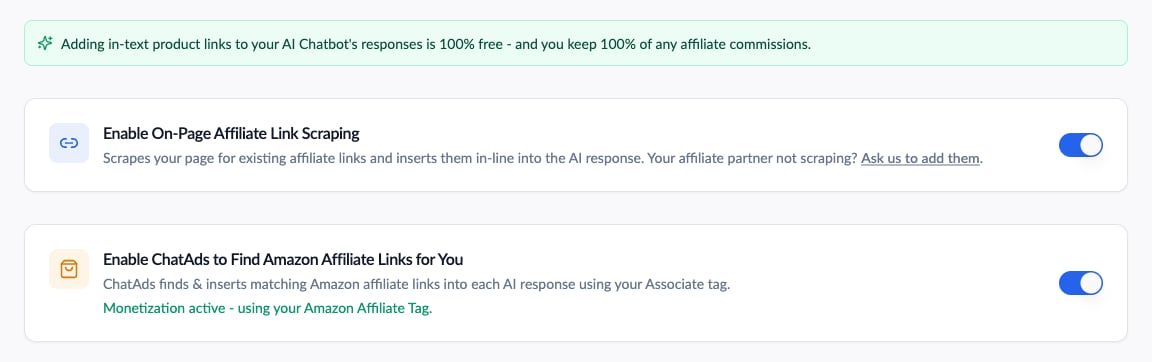 Monetization is opt-in. If you enable neither, ChatAds still works as a content-aware site chat widget. Either way, adding in-text product links is free and you keep 100% of any affiliate commissions.
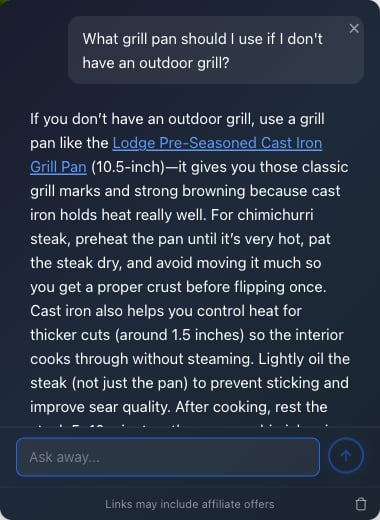
Here's what a monetized reply looks like - the product phrase becomes an in-line link, marked "Sponsored" on hover:
Monetization is opt-in. If you enable neither, ChatAds still works as a content-aware site chat widget. Either way, adding in-text product links is free and you keep 100% of any affiliate commissions.
Here's what a monetized reply looks like - the product phrase becomes an in-line link, marked "Sponsored" on hover:
 ## Amazon Affiliate Links
To enable Amazon monetization, open the **Monetize** tab and toggle on **Enable ChatAds to Find Amazon Affiliate Links for You**, then add your Amazon Associates tag. Without a tag, no links are inserted, and the dashboard shows a warning until you add one. See [Amazon Associates Setup](/partners/amazon-affiliates) for a step-by-step walkthrough, including creating an account from scratch.
You can set separate US and UK tags so each marketplace's links are attributed correctly: `.com` links use the US tag, and `.co.uk` links use the UK tag (falling back to the US tag if no UK tag is set). A US-only publisher needs just the US tag.
Create a dedicated tracking ID for ChatAds traffic (e.g. `mystore-chatads-20`) so you can attribute conversions separately in your Associates reporting.
Turning this toggle on automatically creates a linked ChatAds API key (named "ChatAds Monetization") behind the scenes. It powers the Amazon link lookups and requires no setup from you. If that key is ever deleted or revoked, monetization is disabled automatically and the Monetize tab shows a "Monetization disabled" notice with a one-click Re-enable button.
## Affiliate Link Scraping
Affiliate Link Scraping reuses the affiliate links that already exist on your page instead of generating new ones. When the AI's reply mentions a product that one of your on-page affiliate links points to, ChatAds inserts that link in-line - you keep 100% of the commission, and no Amazon Associates tag is required.
Recognized affiliate link types include:
* **Amazon** - Associate-tagged product links
* **Affiliate networks** - direct inline-redirect links from CJ, Awin, ShareASale, Impact, Rakuten, Pepperjam, Geniuslink, Avantlink, Howl, Affilizz, GeoRiot, Partnerize, Next2, Kickbooster, and Target's and Walmart's own affiliate redirects
* **Page-level redirect tools** - pre-wrapped links from Skimlinks, VigLink, and Sovrn
* **`rel="sponsored"` links** - any anchor you've marked with the `sponsored` rel attribute
* **Tracked links** - links carrying common affiliate tracking parameters (e.g. `clickref`, `aff_id`, `subid`, `ranMID`)
* **Cloaked links** - first-party redirect paths like `/go/`, `/recommends/`, or `/out/`, as created by plugins such as ThirstyAffiliates, Pretty Links, Lasso, and AAWP
Using an affiliate partner we don't yet recognize? [Let us know](mailto:team@getchatads.com?subject=Affiliate%20Partner%20Scraping%20Request) and we'll add it.
Turning scraping on also lets ChatAds surface external (off-site) product links found on the page, but only when a page-level affiliate redirect tool (Skimlinks, VigLink, or Sovrn) is detected - without one, an external link earns nothing, so only same-site links insert. Links to domains that never monetize (Reddit, Wikipedia, YouTube, and other social/reference sites) are always skipped. See [Page Links](#page-links) below for exactly which links insert under each toggle combination.
## Ad Controls
## Amazon Affiliate Links
To enable Amazon monetization, open the **Monetize** tab and toggle on **Enable ChatAds to Find Amazon Affiliate Links for You**, then add your Amazon Associates tag. Without a tag, no links are inserted, and the dashboard shows a warning until you add one. See [Amazon Associates Setup](/partners/amazon-affiliates) for a step-by-step walkthrough, including creating an account from scratch.
You can set separate US and UK tags so each marketplace's links are attributed correctly: `.com` links use the US tag, and `.co.uk` links use the UK tag (falling back to the US tag if no UK tag is set). A US-only publisher needs just the US tag.
Create a dedicated tracking ID for ChatAds traffic (e.g. `mystore-chatads-20`) so you can attribute conversions separately in your Associates reporting.
Turning this toggle on automatically creates a linked ChatAds API key (named "ChatAds Monetization") behind the scenes. It powers the Amazon link lookups and requires no setup from you. If that key is ever deleted or revoked, monetization is disabled automatically and the Monetize tab shows a "Monetization disabled" notice with a one-click Re-enable button.
## Affiliate Link Scraping
Affiliate Link Scraping reuses the affiliate links that already exist on your page instead of generating new ones. When the AI's reply mentions a product that one of your on-page affiliate links points to, ChatAds inserts that link in-line - you keep 100% of the commission, and no Amazon Associates tag is required.
Recognized affiliate link types include:
* **Amazon** - Associate-tagged product links
* **Affiliate networks** - direct inline-redirect links from CJ, Awin, ShareASale, Impact, Rakuten, Pepperjam, Geniuslink, Avantlink, Howl, Affilizz, GeoRiot, Partnerize, Next2, Kickbooster, and Target's and Walmart's own affiliate redirects
* **Page-level redirect tools** - pre-wrapped links from Skimlinks, VigLink, and Sovrn
* **`rel="sponsored"` links** - any anchor you've marked with the `sponsored` rel attribute
* **Tracked links** - links carrying common affiliate tracking parameters (e.g. `clickref`, `aff_id`, `subid`, `ranMID`)
* **Cloaked links** - first-party redirect paths like `/go/`, `/recommends/`, or `/out/`, as created by plugins such as ThirstyAffiliates, Pretty Links, Lasso, and AAWP
Using an affiliate partner we don't yet recognize? [Let us know](mailto:team@getchatads.com?subject=Affiliate%20Partner%20Scraping%20Request) and we'll add it.
Turning scraping on also lets ChatAds surface external (off-site) product links found on the page, but only when a page-level affiliate redirect tool (Skimlinks, VigLink, or Sovrn) is detected - without one, an external link earns nothing, so only same-site links insert. Links to domains that never monetize (Reddit, Wikipedia, YouTube, and other social/reference sites) are always skipped. See [Page Links](#page-links) below for exactly which links insert under each toggle combination.
## Ad Controls
 ### Product Pushiness
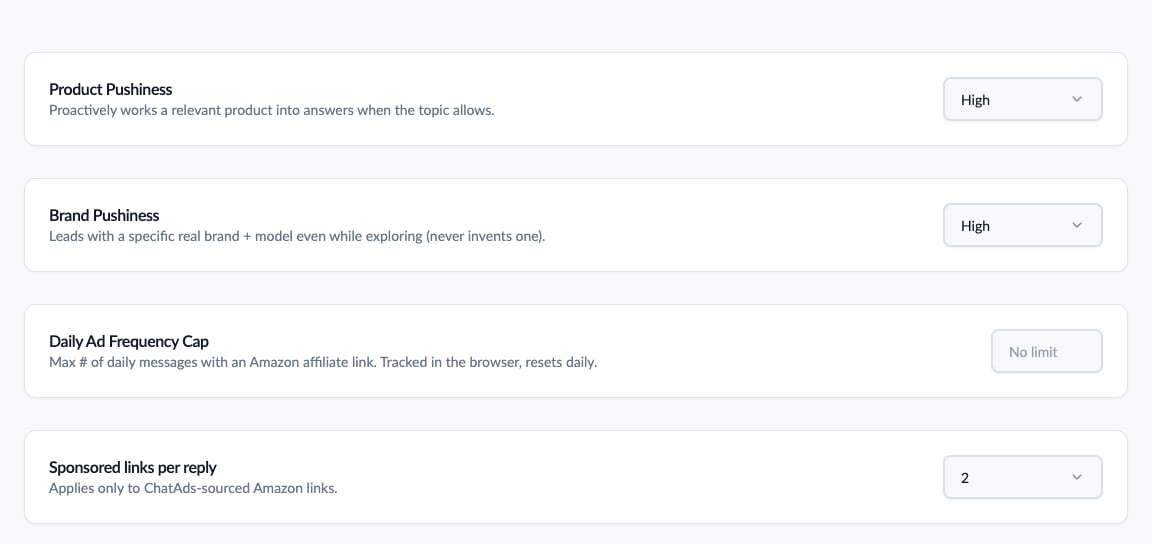
Controls how often the AI works product mentions into its replies. Appears once either monetization toggle is on, and applies to both Amazon links and scraped page links.
* `low` - mentions products only when the visitor asks about finding or buying something
* `medium` (default) - mentions a product whenever it would genuinely help the answer
* `high` - proactively works a relevant product into answers whenever the topic allows
### Brand Pushiness
Separately from *how often* a product is mentioned, this controls *how assertively* the assistant names a specific brand versus a generic product phrase.
* `standard` (default) - names a specific brand only when a visitor is clearly buying; stays generic while they explore
* `high` - leads with a specific real brand and model even while a visitor is just exploring; still never invents a model it isn't sure exists
### Sponsored Links per Reply
How many ChatAds sponsored links can appear in a single reply: 1 (the default) or 2. Applies only to ChatAds-sourced Amazon links, not to scraped page links.
### Daily Ad Frequency Cap
Limits how many monetized replies the same visitor sees in a day (1 to 50; no cap by default; tracked in the visitor's browser, resets daily). For example, set a cap of 5 to make sure regular readers aren't shown sponsored links all day. Scraped page links and your own internal links are not affected - the cap counts ChatAds sponsored links only.
## Offer Quality Controls
### Product Pushiness
Controls how often the AI works product mentions into its replies. Appears once either monetization toggle is on, and applies to both Amazon links and scraped page links.
* `low` - mentions products only when the visitor asks about finding or buying something
* `medium` (default) - mentions a product whenever it would genuinely help the answer
* `high` - proactively works a relevant product into answers whenever the topic allows
### Brand Pushiness
Separately from *how often* a product is mentioned, this controls *how assertively* the assistant names a specific brand versus a generic product phrase.
* `standard` (default) - names a specific brand only when a visitor is clearly buying; stays generic while they explore
* `high` - leads with a specific real brand and model even while a visitor is just exploring; still never invents a model it isn't sure exists
### Sponsored Links per Reply
How many ChatAds sponsored links can appear in a single reply: 1 (the default) or 2. Applies only to ChatAds-sourced Amazon links, not to scraped page links.
### Daily Ad Frequency Cap
Limits how many monetized replies the same visitor sees in a day (1 to 50; no cap by default; tracked in the visitor's browser, resets daily). For example, set a cap of 5 to make sure regular readers aren't shown sponsored links all day. Scraped page links and your own internal links are not affected - the cap counts ChatAds sponsored links only.
## Offer Quality Controls
 ### Category Inclusion / Exclusion
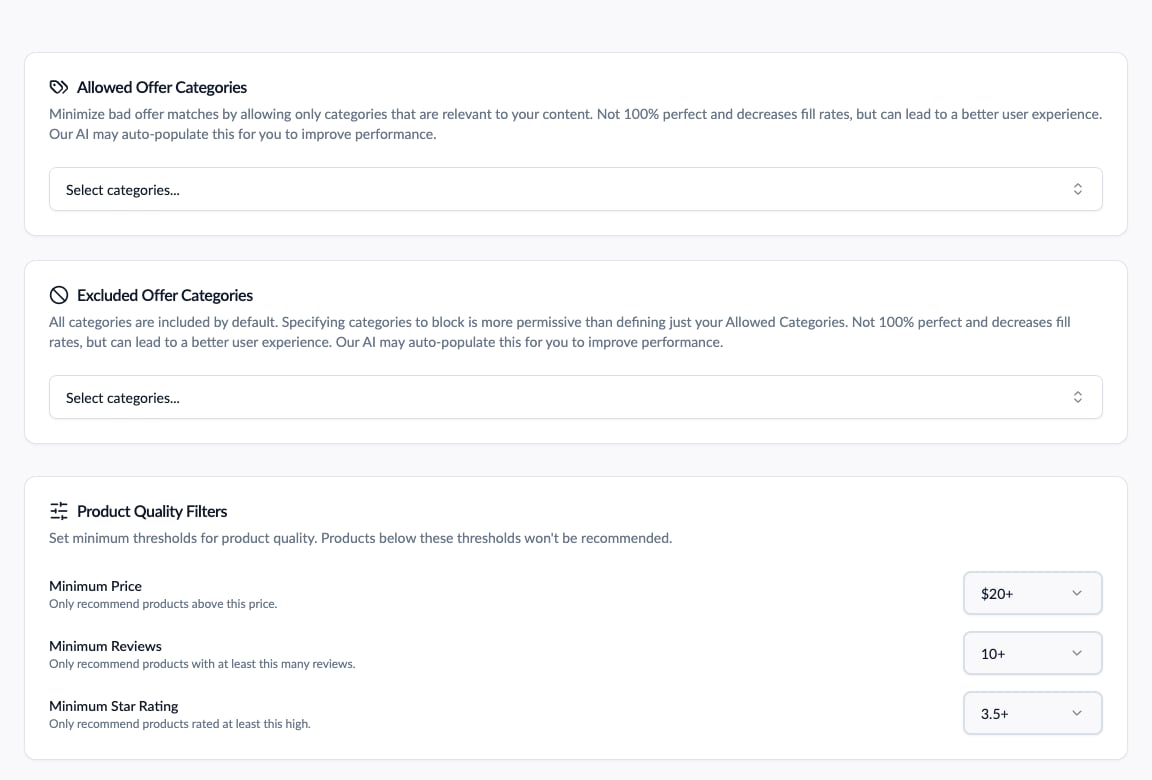
Set rules for which product categories are allowed to appear:
1. An automotive content site might set Allowed Categories to just "Automotive", ensuring only automotive products are shown.
2. If affiliate links are incorrectly matching pet items, add "Pet Supplies" as an excluded category.
Excluding categories is more permissive than defining an allowed list. Our AI may auto-populate your excluded categories over time to improve performance.
### Product Quality Filters
ChatAds only recommends products with a price of \$20+, a review count of 10+, and a star rating of 3.5+. Cheap, poorly-reviewed products make bad affiliate offers, so these floors maximize commissions.
You can raise (never lower) the thresholds from the Monetize tab: minimum price up to $50/$100/\$500, minimum reviews up to 500, and minimum rating up to 4.0 or 4.5 stars.
### Auto-Blocked Categories
Independent of your own rules, ChatAds automatically excludes categories that tend to be low-value or noisy for affiliate revenue: Accessories, Apps & Games, Books, Collectibles, Digital & Physical Media, Gift Cards, Grocery, Scientific & Industrial, Software, and Tobacco, Alcohol, & Other Sensitive Products. The full list is shown at the bottom of the Monetize tab. These cannot be re-enabled.
## Country & Language Targeting
### Category Inclusion / Exclusion
Set rules for which product categories are allowed to appear:
1. An automotive content site might set Allowed Categories to just "Automotive", ensuring only automotive products are shown.
2. If affiliate links are incorrectly matching pet items, add "Pet Supplies" as an excluded category.
Excluding categories is more permissive than defining an allowed list. Our AI may auto-populate your excluded categories over time to improve performance.
### Product Quality Filters
ChatAds only recommends products with a price of \$20+, a review count of 10+, and a star rating of 3.5+. Cheap, poorly-reviewed products make bad affiliate offers, so these floors maximize commissions.
You can raise (never lower) the thresholds from the Monetize tab: minimum price up to $50/$100/\$500, minimum reviews up to 500, and minimum rating up to 4.0 or 4.5 stars.
### Auto-Blocked Categories
Independent of your own rules, ChatAds automatically excludes categories that tend to be low-value or noisy for affiliate revenue: Accessories, Apps & Games, Books, Collectibles, Digital & Physical Media, Gift Cards, Grocery, Scientific & Industrial, Software, and Tobacco, Alcohol, & Other Sensitive Products. The full list is shown at the bottom of the Monetize tab. These cannot be re-enabled.
## Country & Language Targeting
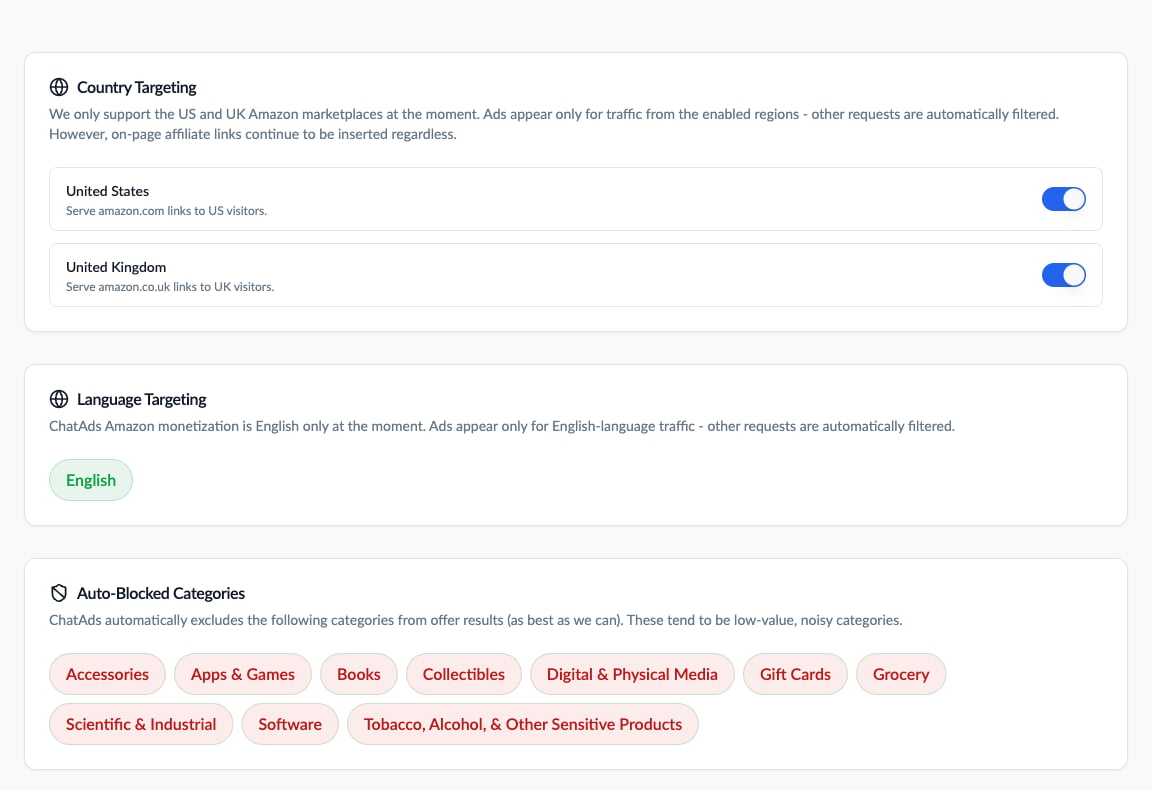 Sponsored Amazon links currently support the **Amazon US and UK** marketplaces, and ads are shown for **English-language** text only. Toggle either marketplace on or off (at least one must stay enabled). Traffic from other countries and non-English requests is automatically filtered out; on-page scraped links continue to insert regardless. Support for additional marketplaces and languages is planned.
## Page Links
Beyond affiliate links, ChatAds also surfaces regular product links already on your page - for example, internal review links - when the AI mentions a matching product phrase. These insert in addition to ChatAds offers, not instead of them.
Behavior by toggle state:
1. **Both ON:** ChatAds Amazon offers insert first, then up to 10 matching page links - your on-page affiliate links take priority, then external page product links (only when a page-level redirect tool is present), then internal page product links. Each product phrase is linked at most once, highest priority wins.
2. **Amazon ON, Scraping OFF:** ChatAds Amazon offers insert. Your own internal page product links still insert for matched product phrases. On-page affiliate links and external page product links are skipped.
3. **Amazon OFF, Scraping ON:** No ChatAds offers. Your on-page affiliate links and internal page product links insert for matched phrases (up to 10 per reply); external page product links insert only when a page-level redirect tool is detected.
4. **Both OFF:** ChatAds still links to products on your own site when they appear in the AI's response (internal page product links only, up to 10 per reply). On-page affiliate links, external links, and ChatAds offers are all skipped.
How page links are labeled depends on their type:
* **Scraped affiliate links** (your on-page Amazon and affiliate network links) are treated like ad units: they show a "Sponsored" label on hover and their clicks are tracked in your usage charts, the same as ChatAds offers.
* **Page product links** (your own internal or external non-affiliate links) are styled as normal links - no "Sponsored" label and no click tracking.
Neither type counts against your daily ad cap - only ChatAds offers do.
## Tracking Your Earnings
ChatAds never takes a cut of commissions, so earnings live in your affiliate accounts (e.g. Amazon Associates reporting). On the ChatAds side, the [Usage tab](/guides/analytics) tracks every inline link click and offers a per-click CSV export you can reconcile against your affiliate network reporting.
Sponsored Amazon links currently support the **Amazon US and UK** marketplaces, and ads are shown for **English-language** text only. Toggle either marketplace on or off (at least one must stay enabled). Traffic from other countries and non-English requests is automatically filtered out; on-page scraped links continue to insert regardless. Support for additional marketplaces and languages is planned.
## Page Links
Beyond affiliate links, ChatAds also surfaces regular product links already on your page - for example, internal review links - when the AI mentions a matching product phrase. These insert in addition to ChatAds offers, not instead of them.
Behavior by toggle state:
1. **Both ON:** ChatAds Amazon offers insert first, then up to 10 matching page links - your on-page affiliate links take priority, then external page product links (only when a page-level redirect tool is present), then internal page product links. Each product phrase is linked at most once, highest priority wins.
2. **Amazon ON, Scraping OFF:** ChatAds Amazon offers insert. Your own internal page product links still insert for matched product phrases. On-page affiliate links and external page product links are skipped.
3. **Amazon OFF, Scraping ON:** No ChatAds offers. Your on-page affiliate links and internal page product links insert for matched phrases (up to 10 per reply); external page product links insert only when a page-level redirect tool is detected.
4. **Both OFF:** ChatAds still links to products on your own site when they appear in the AI's response (internal page product links only, up to 10 per reply). On-page affiliate links, external links, and ChatAds offers are all skipped.
How page links are labeled depends on their type:
* **Scraped affiliate links** (your on-page Amazon and affiliate network links) are treated like ad units: they show a "Sponsored" label on hover and their clicks are tracked in your usage charts, the same as ChatAds offers.
* **Page product links** (your own internal or external non-affiliate links) are styled as normal links - no "Sponsored" label and no click tracking.
Neither type counts against your daily ad cap - only ChatAds offers do.
## Tracking Your Earnings
ChatAds never takes a cut of commissions, so earnings live in your affiliate accounts (e.g. Amazon Associates reporting). On the ChatAds side, the [Usage tab](/guides/analytics) tracks every inline link click and offers a per-click CSV export you can reconcile against your affiliate network reporting.